Checkout our latest project

-
With DocPHT you can take notes and quickly document anything and without the use of any database.




Donate to help keep this project maintained.

 If you use it, you should star it on Github!
It’s the least you can do for all the work put into it!
If you use it, you should star it on Github!
It’s the least you can do for all the work put into it!
Group_assign
Assign Tasks to Groups or from Multi-Select of Users with permissions from the project
Requirements
Kanboard v1.1.0 or Higher, except 1.2.45 to 1.2.48.
Group_assign Version 1.8.3 will support Kanboard 1.2.45 to 1.2.48.
Group_assign Versions 1.7.7 and below will support PHP version below 7
Features and usage
- A task can have an assigned group or selection of users
- Can only assign groups or other assigness to a task that have permissions in the Project.
- If a user is in a group that a task is assigned to, it will show up on their dashboard.
- If a user is in other assignees multiselect that a task is assigned to, it will show up on their dashboard.
- If a user is in a group that a task is assigned to, it will show up in their calendar.
- If a user is in other assignees multiselect that a task is assigned to, it will show up in their calendar.
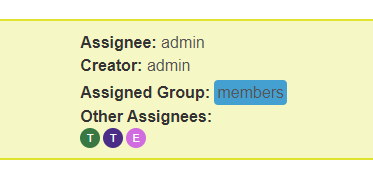
- If a group is assigned or a user is assigneed in other assignees, it will be appear on the task in detail view, board view, creation, modification.
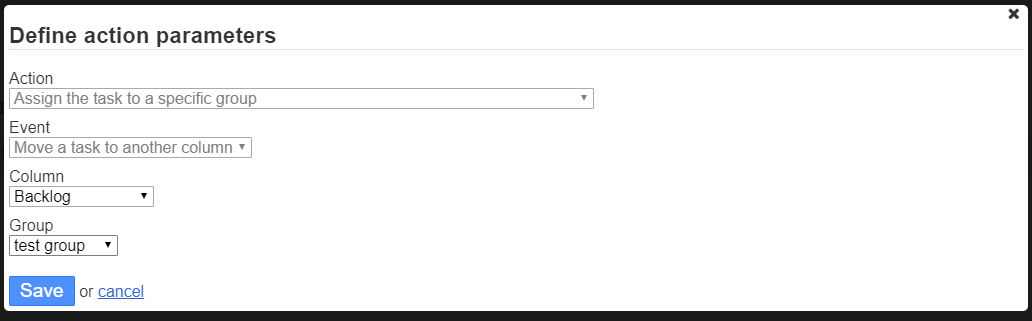
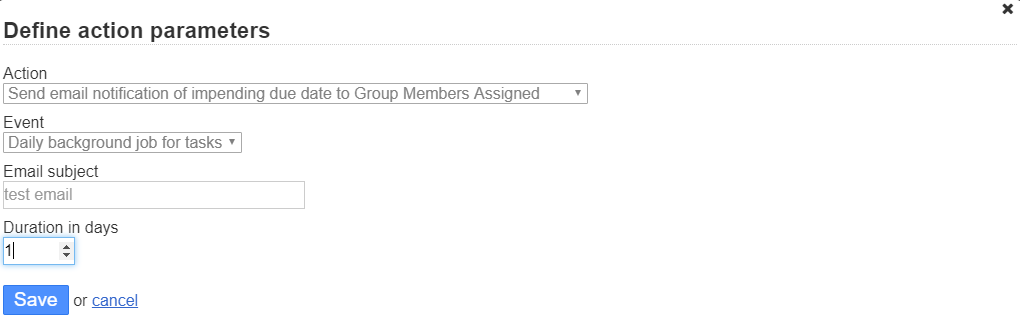
- Includes 5 Automatic Actions to utilize the Assigned Group
- Email Assigned Group on Task Modification, Creation, Close, or Movement
- Email Assigned Group of impending Task Due Date
- Email Other Assignees on Task Modification, Creation, Close, or Movement
- Email Other Assignees of impending Task Due Date
- Assign task to a group on creation or movement
- using
allassignees:me(assignee:mefor pre 1.7.3 versions) in filter will find tasks assigned to groups that the user is in or assignee in other assignees is in. - using
allassignees:GroupName(assignee:GroupNamefor pre 1.7.3 versions) in filter will find tasks assigned to a group by NAME of the group. - using
allassignees:GroupID(assignee:GroupIDfor pre 1.7.3 versions) in filter will find tasks assigned to a group by ID number of group. - using
allassignees:Usernameorallassignees:Namewill find all tasks assigned to that user regardless of how they have been assigneed, whether in the group or in Other Assignees or Assignee. - User assigneed via a group or multiselect will now recieve notifications
- Changing assigned group or any multiselect users will now trigger
EVENT_ASSIGNEE_CHANGE - Duplicating Tasks will include assigned groups and other users.
- Duplicating to another project or moving to another project will check permissions of assignees, and remove those without permission.
- Task Reccurences will include group assigned and other assignees in the recurrence.
- Setting included to enable group managment for Application Managers
- Found in
Settings > Application settings
- Found in
JSON-RPC API
The plugin registers these Kanboard JSON-RPC methods. All writes reject groups and users that are not assignable in the target project and return false on validation failure.
createTaskGroupAssign(...)
Creates a task with the standard Kanboard createTask arguments plus:
| Extra argument | Meaning |
|---|---|
group_id |
Assigned Group id. Use 0 for no group. |
other_assignees |
Array of user ids for Other Assignees. Use [] for none. |
The plugin stores these fields as tasks.owner_gp and tasks.owner_ms. When there are no Other Assignees, owner_ms is kept as 0; the plugin does not keep empty multiselect containers as task assignments.
updateTaskGroupAssign(...)
Updates a task with the standard Kanboard updateTask arguments plus group_id and other_assignees.
Warning: this method keeps the historical overwrite behavior:
- omitted
group_idclears the Assigned Group (owner_gp = 0); - omitted
other_assigneesclears Other Assignees (owner_ms = 0); -
owner_id = nullpreserves the current main assignee; - do not pass
other_assignees = null; pass an array, or omit it only when you intend to clear.
Prefer patchTaskGroupAssign() when you only need to change group/other-assignee fields.
getTaskGroupAssign(id)
Returns:
{
  "task_id": 123,
  "group_id": 45,
  "other_assignee_ids": [7, 8],
  "other_assignees": [
    {
      "id": 7,
      "username": "alice",
      "name": "Alice",
      "email": "alice@example.com",
      "avatar_path": "",
      "is_active": 1
    }
  ],
  "multiselect_id": 67
}
other_assignees contains only public user fields. multiselect_id is an internal container id; use other_assignee_ids for API updates.
patchTaskGroupAssign(id, group_id = null, other_assignees = null)
Safely updates only the assignment fields passed by the caller:
- omit
group_idor passnullto preserve the current Assigned Group; - pass
group_id = 0to clear the Assigned Group; - omit
other_assigneesor passnullto preserve current Other Assignees; - pass
other_assignees = []to clear Other Assignees; - pass
other_assignees = [1, 2]to replace Other Assignees with exactly those users.
Safe merge flow:
- Call
getTaskGroupAssign(id). - Merge your intended
group_idorother_assignee_idschange locally. - Call
patchTaskGroupAssign(id, group_id, other_assignees). - Call
getTaskGroupAssign(id)again and verify the returned assignment.
Future enhancments
Find bugs or missing functionality, please report it.
- Add a few basic automatic actions that utilize Groups assigned
-
Add relationship for
allassignees:Usernameorallassignees:Namein the table lookup - Add an event for assigned group change.
- Incorporate into notifications
- Address Task Duplication
- Task Recurrence
Manual Installation
- Find the release you wish to install: https://github.com/creecros/Group_assign/releases
- Download the provided zip, not the source zip, i.e.
Group_assign-x.x.x.zip - Unzip contents to the plugins folder
In the event that you use the master repo, ensure that the directory of the plugin is named Group_assign, or else the plugin will not work.
Screenshots
Task Details:
Task Creation/Modification:


Board View:

Users Calendar View
- Tasks that a user is assigned too but not main assignee will show up in calendar, with Dark Grey Background and Task color Border, to differentiate that they are not the main assignee.

Automatic Actions: